
The Privacy Notice was last changed on November 18, 2026, at 00:45 EST. The Privacy Notice was written specifically for SharpAlert version 19.5.0.
If you do not want to send telemetry information, you can disable the setting in the app's settings. Additionally, read the last paragraph of this Privacy Notice for information on how you can request deletion of your Personally Identifiable Information (PII).
In the context of this Privacy Notice, "App" or "app" refers to SharpAlert, and "ORION" refers to the server where SharpAlert can send information to.
[Internet / Telemetry]
The app can retrieve alert data from the user's currently selected alert servers. An "alert server" also may be referred to as a "region". Each alert server can separately be enabled or disabled individually by the user in the app's "Region Settings".
By default, the app will collect and send information to ORION. You can opt out of all telemetry in the app's settings. To do this, open the app's settings. Click the "Advanced Mode" button (if you are in "Simple Mode"), then click the "Extra Options" button. Finally, uncheck the "Allow telemetry" check box.
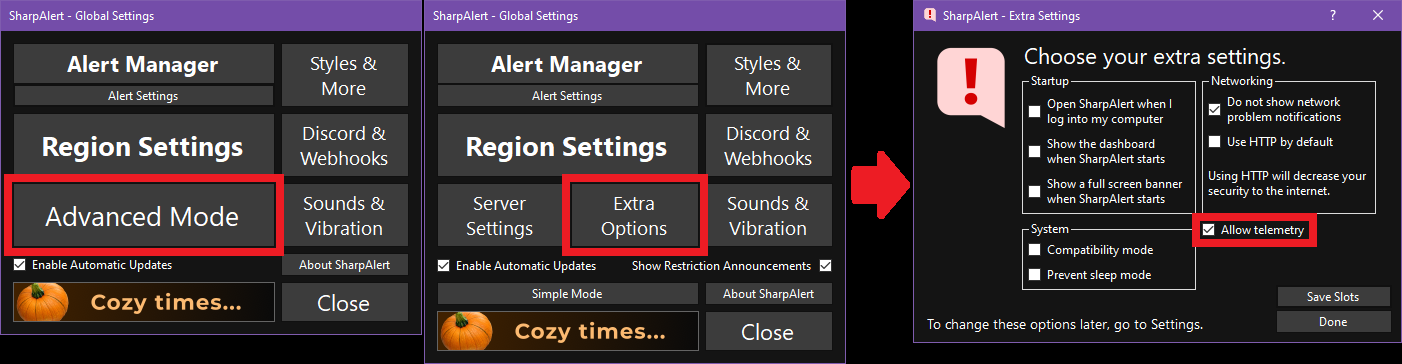
Read the last paragraph of this Privacy Notice for information on deletion.
The app may send the following information:
Any bullet points marked with a "#" (pound symbol) are treated as Personally Identifiable Information (PII). Read the last paragraph of this Privacy Notice for information on deletion.
[Discord Rich Presence]
The app connects to an open Discord client to provide activity data to Discord. The activity data will appear on the user's profile if they have allowed it in the app's settings. This activity data includes alert information, such as, the alert type, alert beginning/end date and time, locations specified by the alert, and partial alert text. Activity data is sent using the most recent alert that has been relayed, and displays for up to 15 minutes, or until the alert expires, whichever one comes first.
[Discord Webhooks]
The app can automatically send messages to a Discord text channel using a Discord webhook. Each alert message includes alert information, such as, the alert type, the alert severity, alert beginning/end date and time, locations specified by the alert, and full alert text. Messages are also sent when the app changes in status, such as SharpAlert starting, or SharpAlert exiting. If the computer running the app has a battery installed, the app will send customizable battery status messages.
[Storage]
The user's settings are stored locally on the device. The app stores user preferences and settings in the user's home directory, under "C:\Users\<username>\AppData\Local\SharpAlert". ("<username>" is a placeholder for the actual username!)
[Location]
The user can select locations to store locally in multiple forms. The user's selected locations are used in the alert processing parts of the app to determine if an alert should or should not be relayed.
ORION is a server operated and maintained by MaybeConnor, a contributing developer of SharpAlert. Information sent to the server can be seen by developers. Any Personally Identifiable Information (PII) received by the server is automatically deleted after 30 days. Any non-identifiable information may be kept to help with software development or to display combined statistics with other app users on this website.
For questions on this Privacy Notice, or to request deletion of all Personally Identifiable Information (PII) sent to ORION, contact BunnyTub. Find contact information in the footer of this page.